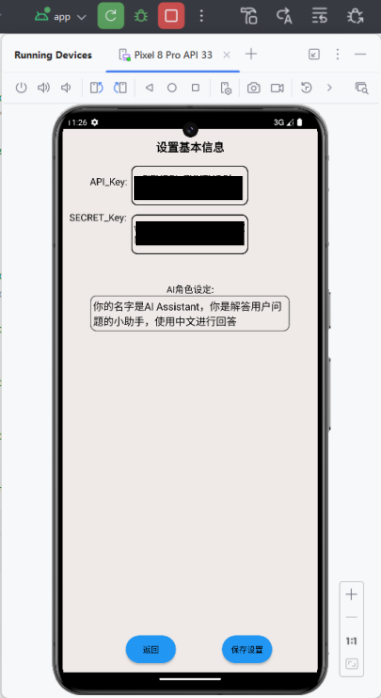
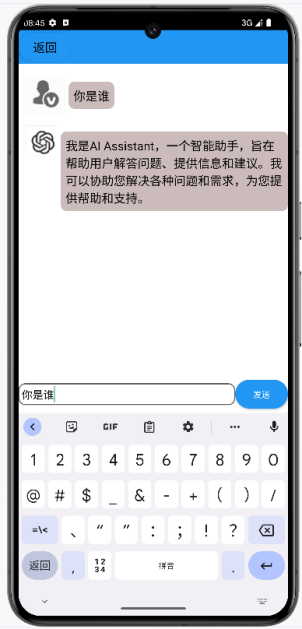
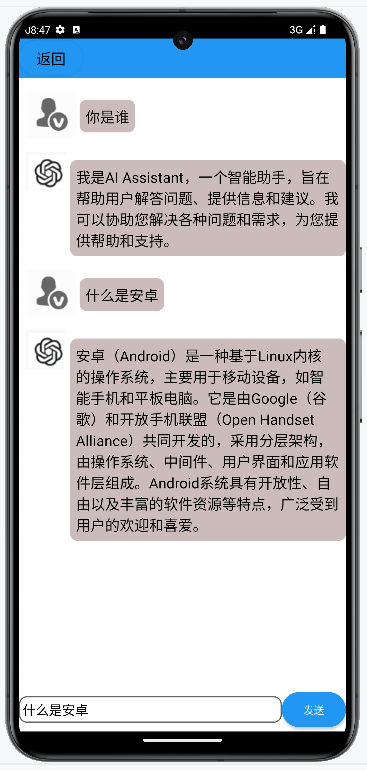
做了一个接入AI的AI问答助手APP

具体实现:

1.在Android应用的AndroidManifest.xml文件中添加网络访问权限:

1
<uses-permission android:name="android.permission.INTERNET" />

在build.gradle中添加必要的依赖(使用http请求api):

1
implementation 'com.squareup.okhttp3:okhttp:4.9.3'

2.创建一个新的类以处理文心一言的API信息:WenXin.java,在Activity里需要实现文心一言的对话功能只需调用这个类就好了。

1
2
3
4
5
6
7
8
9
10
11
12
13
14
15
16
17
18
19
20
21
22
23
24
25
26
27
28
29
30
31
32
33
34
35
36
37
38
39
40
41
42
43
44
45
46
47
48
49
50
51
52
53
54
55
56
57
58
59
60
61
62
63
64
65
66
67
68
69
70
71
72
73
74
75
76
77
78
79
80
81
82
83
84
85
86
87
88
89
90
package com.example.myapp.config;

import org.json.JSONArray;
import org.json.JSONException;
import org.json.JSONObject;

import java.io.IOException;
import java.util.concurrent.TimeUnit;

import okhttp3.*;

/**
* 主要用于实现对接千帆大模型API的功能
*/
public class AiConfig {
public String API_KEY;

public String SECRET_KEY;

public String AI_Role;

public JSONArray Dialogue_Content;

/**
* AiConfig类的初始化设置,设置好apikey等参数,以向服务器发送信息,airole参数的作用是自定义ai助手的角色功能类型
*
*/
public AiConfig(String apikey, String secrectkey, String airole){
Dialogue_Content=new JSONArray();
API_KEY=apikey;
SECRET_KEY=secrectkey;
AI_Role=airole;
}

static final OkHttpClient HTTP_CLIENT = new OkHttpClient.Builder().connectTimeout(10, TimeUnit.SECONDS).writeTimeout(60, TimeUnit.SECONDS).readTimeout(60, TimeUnit.SECONDS).build();
public void GetAnswer(String user_msg,final ResponseCallback callback) throws IOException, JSONException{
JSONObject jsonObject = new JSONObject();
jsonObject.put("role", "user");
jsonObject.put("content", user_msg);

Dialogue_Content.put(jsonObject);
MediaType mediaType = MediaType.parse("application/json");
RequestBody body = RequestBody.create(mediaType, "{\"messages\":" + Dialogue_Content.toString() + ",\"system\":\"" + AI_Role + "\",\"disable_search\":false,\"enable_citation\":false}");

Request request = new Request.Builder().url("https://aip.baidubce.com/rpc/2.0/ai_custom/v1/wenxinworkshop/chat/ernie-speed-128k?access_token=" + getAccessToken()).method("POST", body).addHeader("Content-Type", "application/json").build();

HTTP_CLIENT.newCall(request).enqueue(new Callback() {
@Override
public void onResponse(Call call, Response response){
try {
if (response.isSuccessful()) {
JSONObject json_feedback = new JSONObject(response.body().string());
String res = json_feedback.getString("result");
JSONObject jsontmp = new JSONObject();
jsontmp.put("assistant", res);
Dialogue_Content.put(jsontmp);
callback.onSuccess(res);
} else {
callback.onError("服务器返回错误:" + response.code());
}
} catch (Exception e) {
callback.onError(e.getMessage());
}
}

@Override
public void onFailure(Call call, IOException e) {
callback.onError(e.getMessage());
}
});

}
/**
* 从用户的AK,SK生成鉴权签名(Access Token)
*
*/
public String getAccessToken() throws IOException, JSONException {
MediaType mediaType = MediaType.parse("application/x-www-form-urlencoded");
RequestBody body = RequestBody.create(mediaType, "grant_type=client_credentials&client_id=" + API_KEY + "&client_secret=" + SECRET_KEY);
Request request = new Request.Builder().url("https://aip.baidubce.com/oauth/2.0/token").method("POST", body).addHeader("Content-Type", "application/x-www-form-urlencoded").build();
Response response = HTTP_CLIENT.newCall(request).execute();
return new JSONObject(response.body().string()).getString("access_token");
}
// 回调接口
public interface ResponseCallback {
void onSuccess(String response);
void onError(String error);
}
}

3.在Activity中这样写

1
2
3
4
5
6
7
8
9
10
11
12
13
14
15
16
17
18
19
20
21
22
23
24
25
26
27
28
29
30
31
32
33
34
35
36
37
38
39
40
41
42
43
44
45
46
47
48
49
50
51
52
53
54
55
56
57
58
59
60
61
62
63
64
65
66
67
68
69
70
71
72
73
74
75
76
77
78
79
80
81
82
83
84
85
86
87
88
89
90
91
92
93
94
95
96
97
98
99
100
101
102
103
104
105
106
107
108
109
110
111
112
113
114
115
116
117
118
119
120
121
122
123
124
125
126
127
128
129
130
131
132
133
134
135
136
137
138
139
140
141
142
143
package com.example.myapp.activity;

import android.app.Activity;
import android.content.Intent;
import android.content.SharedPreferences;
import android.os.Bundle;
import android.os.Handler;
import android.os.Looper;
import android.os.Message;
import android.view.View;
import android.widget.Button;
import android.widget.EditText;
import androidx.recyclerview.widget.LinearLayoutManager;
import androidx.recyclerview.widget.RecyclerView;
import com.airbnb.lottie.LottieAnimationView;
import com.example.myapp.config.AiConfig;
import com.example.myapp.model.Chatlist;
import com.example.myapp.R;
import com.example.myapp.adapter.ChatlistAdapter;
import org.json.JSONException;
import java.io.IOException;
import java.util.ArrayList;
import java.util.List;

public class ChatActivity extends Activity {

private EditText et_chat;

private Button btn_send,btn_chat_return;

private ChatlistAdapter chatAdapter;

private List<Chatlist> mDatas;

private SharedPreferences preferences;

private RecyclerView rc_chatlist;

private LottieAnimationView lo_msgloading;

final int MESSAGE_UPDATE_VIEW = 1;

@Override
protected void onCreate(Bundle savedInstanceState) {
super.onCreate(savedInstanceState);
setContentView(R.layout.activity_chat);
init();
mDatas = new ArrayList<>();
//读取用户设置里的千帆大模型的API_Key等信息,这里设置了我自己的密钥
preferences= this.getSharedPreferences("usersetting",MODE_PRIVATE);
String apikey=preferences.getString("API_Key","w******je**********lhG9W");
String secretkey=preferences.getString("Secret_Key","wRU******HV6LSW************XX6h3");
String airole=preferences.getString("Role","你的名字是AI Assistant,你是解答用户问题的小助手,使用中文进行回答");

chatAdapter=new ChatlistAdapter(this,mDatas);

LinearLayoutManager layoutManager = new LinearLayoutManager(this );
rc_chatlist.setLayoutManager(layoutManager);
rc_chatlist.setHasFixedSize(true);
rc_chatlist.setAdapter(chatAdapter);
btn_send.setOnClickListener(v -> {
btn_send.setVisibility(View.GONE);//点击发送按钮之后,按钮会隐藏
lo_msgloading.setVisibility(View.VISIBLE);
//用户的提问
String user_ask=et_chat.getText().toString();//获取输入框里的信息
Chatlist CC;
CC=new Chatlist("USER",user_ask);
mDatas.add(CC);

chatAdapter.ResetChatlistAdapter(mDatas);
rc_chatlist.setAdapter(chatAdapter);
AiConfig AI=new AiConfig(apikey,secretkey,airole);
//千帆大模型的回答
new Thread(() -> {
//请求详情
try {
AI.GetAnswer(user_ask, new AiConfig.ResponseCallback() {
@Override
public void onSuccess(String response) {
// 在这里处理获取到的结果
Chatlist CD;
String AIresult=response.toString();
CD=new Chatlist("AI Assistant",AIresult);

mDatas.add(CD);
chatAdapter.ResetChatlistAdapter(mDatas);

Message msg = new Message();
msg.what = MESSAGE_UPDATE_VIEW;
ChatActivity.this.gHandler.sendMessage(msg);
}

@Override
public void onError(String error) {
// 在这里处理错误情况
Chatlist CF;
String AIresult="获取信息失败";
CF=new Chatlist("AI Assistant",AIresult);

mDatas.add(CF);
chatAdapter.ResetChatlistAdapter(mDatas);

Message msg = new Message();
msg.what = MESSAGE_UPDATE_VIEW;
ChatActivity.this.gHandler.sendMessage(msg);
}
});
} catch (IOException e) {
throw new RuntimeException(e);
} catch (JSONException e) {
throw new RuntimeException(e);
}

}).start();

});
btn_chat_return.setOnClickListener(v -> {
Intent intent=new Intent(ChatActivity.this, MainActivity.class);
startActivity(intent);
ChatActivity.this.finish();
});

}

private void init(){
btn_send=findViewById(R.id.btn_send);
et_chat=findViewById(R.id.et_chat);
btn_chat_return=findViewById(R.id.btn_chat_return);
rc_chatlist=findViewById(R.id.rc_chatlist);
lo_msgloading=findViewById(R.id.lo_msgloading);
}

public Handler gHandler = new Handler(Looper.getMainLooper()) {
@Override
public void handleMessage(Message msg) {
if (msg.what == MESSAGE_UPDATE_VIEW) {
rc_chatlist.setAdapter(chatAdapter);
btn_send.setVisibility(View.VISIBLE);//恢复按钮
lo_msgloading.setVisibility(View.INVISIBLE);
}
}
};
}

效果:


做了一个接入AI的AI问答助手APP
http://blog.hrseno.cn/2025/01/10/移动应用开发接入AI/
作者
黄浩森
发布于
2025年1月10日
许可协议